Skip to content

News

What’s new in guito

guito's launches and what's new in the app.

November

  1. New

    Track your Portuguese pension funds

    Portuguese open pension funds and PPRs set up as pension funds from managers such as Ageas, BPI, Caixa, Crédito Agrícola and BBVA are now in the catalogue. Record your purchase and your holding's value follows the unit price, updated automatically every day.

    Learn more
  2. Improvements

    23 to 29 November

    • Track your Santander PPR and unit-linked insurancePPR and unit-linked insurance policies from Santander Totta Seguros, such as Seguro PPR+ Conservador, Equilibrado, Crescimento and Ações, are now in the catalogue. Record your purchase and your holding's value follows the unit price, updated automatically every day.
    • The Home chart now runs edge to edgeApp only. At the top of Home, your net worth chart now runs from one edge of the screen to the other and grows so your summary fills the screen before you scroll. Your accounts, investments, property and what you owe sit in bigger rows: tap anywhere on one to open its page. The charts on Investments, Accounts, Property & valuables and Loans use the full width too.
  3. New

    Get alerts for your budgets and goals

    Find out when your spending reaches 80%, 100% and 120% of a budget’s cap, and when a goal reaches 75% and 100%. Alerts are already on for all your budgets and goals: they arrive on your phone if the app is allowed to send you notifications, and by email otherwise.

    Learn more
  4. New

    Merge the account you imported into your bank’s, with nothing counted twice

    If you started by importing a bank’s statement and then connected that bank, the months both accounts covered were counted twice. Now Accounts asks whether it’s the same account and, if it is, the history you imported moves into the bank’s account, with the categories and notes you gave those transactions.

    Learn more
  5. Improvements

    16 to 22 November

    • You can now connect your Klarna accountKlarna is in the list of banks in Portugal when you add an account, and the transactions from your Klarna account come in automatically.
    • Automatic categories learn better from your correctionsWhen you change a transaction’s category, similar transactions follow your latest choice. For payments to a person and money they send you, by MB WAY or bank transfer, the category follows the one you chose for similar amounts, and when you correct one you can apply the change to those only or to everything with that person.
    • Your mortgage gets its own categoryYour monthly mortgage payment no longer shows under Rent: it sits in the new Mortgage category. Early repayments of your loan no longer count as spending. Your car loan and personal loan payments have a category of their own now too, Other loans.
    • See and write your notes in the transactions listWeb only. In Detailed transactions, open Columns and choose Notes: each row shows its note, and you can write it right there without opening the transaction.
  6. NewApp only

    See what comes in and goes out this week in the Agenda

    App only. The Agenda opens on the current week and shows, day by day, what will come into and go out of your accounts. With the Plus plan, you can also schedule a payment or income on a manual account, once or on a regular basis.

    Learn more
  7. New

    Record shares you were given or brought from another broker

    A share your broker gave you, such as a bonus or saveback, goes in as a purchase at a price of 0, and its value counts as a gain. If you import your broker’s file and it shows the shares you brought from another broker or moved to one, those are already marked and don’t count as money invested or as a gain.

    Learn more
  8. NewWeb only

    Meet the new guito on the web

    guito has a new look on the web that is simpler and tidier. The sidebar starts with what you use every day, Home, Agenda, Cash flow and Analysis, and Cash flow opens on the current month.

    Learn more
  9. New

    See your income, expenses and key dates in the Agenda

    The Agenda brings together your income and expenses day by day: your salary, regular bills, loan instalments, expected dividends and what you set aside for your goals. You can also add calendars for tax deadlines and the days the companies you invest in report their results.

    Learn more
  10. NewWeb only

    Compare months and save reports in Analysis

    Web only. Analysis shows how your spending, your investments and your net worth have changed over time. You can save the reports you use most and pin them to Home, which also shows them in the app.

    Learn more
  11. New

    Count your salary in the month you live on it

    If your salary arrives on 30 September and pays for October, you can count it in October. The transaction keeps the bank's date, but the month's totals, your savings rate and your budgets count it in the month you choose.

    Learn more
  12. New

    See what your home earns, with its costs and income

    On each asset's page you can record the rent you receive, what you pay to keep it, such as service charges, council tax or insurance, and the work you have done on it. The asset then shows its net income and an annualised return that takes all of it into account.

    Learn more
  13. New

    See the payments your bank hasn’t confirmed yet

    Card payments your bank hasn’t confirmed yet now show at the top of your transactions, with Pending where the date goes. They don’t count towards your spending or budgets, and become normal transactions once the bank confirms them. On accounts such as Revolut, the balance after each transaction now matches your banking app.

    Learn more
  14. Improvements

    9 to 15 November

    • Tag several transactions at onceIn Cash flow or in an account, select the transactions (in the app, press and hold one), choose Tag and pick the tags. Each transaction keeps the tags it already had.
    • See the purchases your bank hasn’t sent yetWith ActivoBank and Millennium BCP, when the balance already deducts purchases the bank hasn’t sent yet, the account shows how much is still outstanding. The notice goes away once the transactions arrive.
    • Weekend purchases on the day you made themWhen the bank books a transaction days later, the list now shows it on the day it was made, whenever the bank provides that day. The day the bank booked it appears in the transaction’s details, under Booked.
  15. New

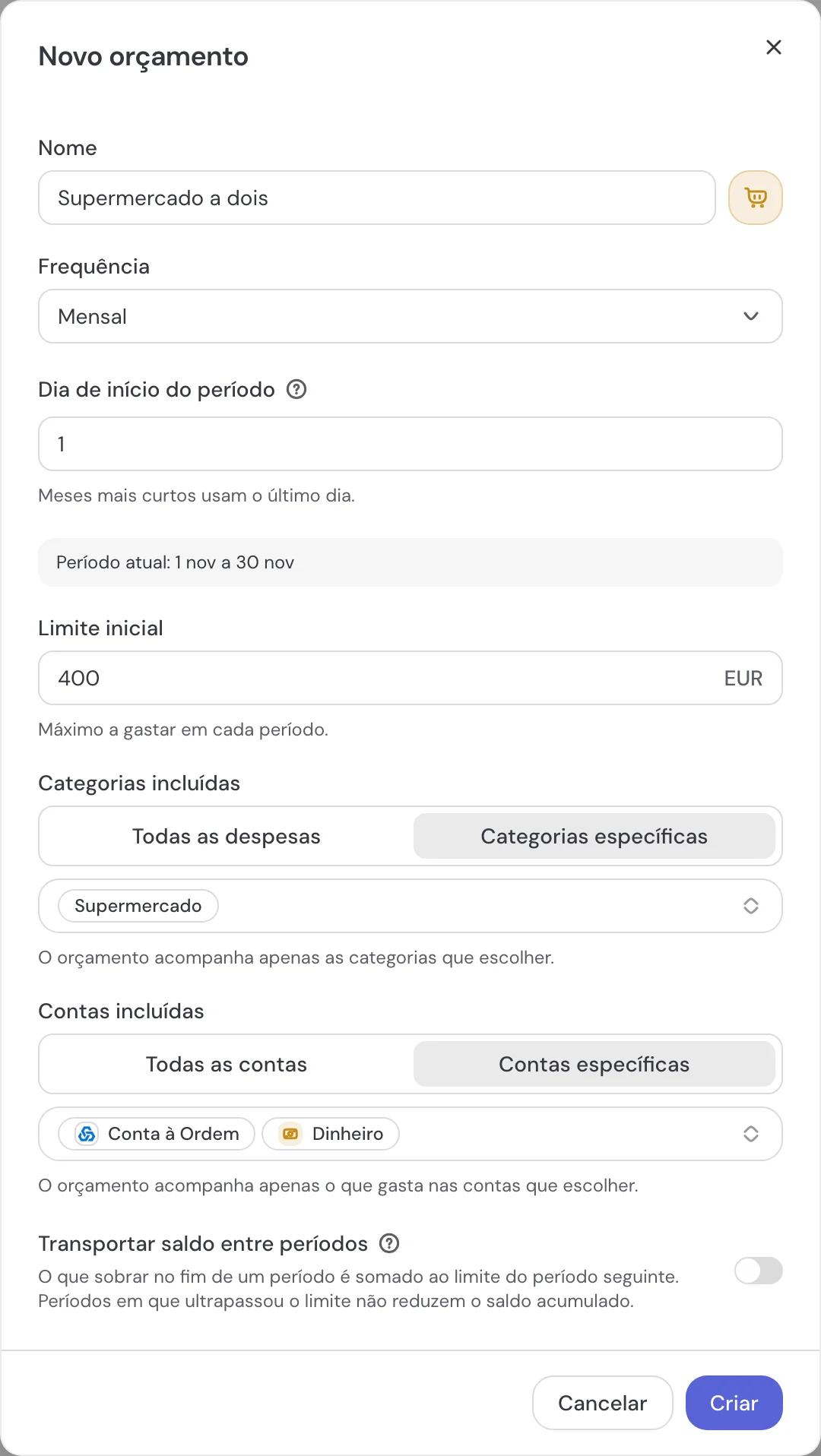
    Choose which accounts each budget counts

    A budget can count spending from just some of your accounts. A groceries budget on a joint account, for example, leaves out what you pay from your personal one.

    Learn more
  16. New

    See what a trip cost, with tags

    A tag is a name of your own, such as “Canary Islands trip”, that groups transactions from different categories. The transactions keep their categories, and filtering by the tag shows what it all cost together.

    Learn more
  17. New

    Track manual investments by quantity and price

    For a share, ETF, fund, bond or crypto you track by hand, you can enter the quantity and price of each purchase, just as you would at a broker. The investment is then worth the quantity times the last price you entered, and you can update that price whenever you like.

    Learn more

October

  1. NewWeb only

    See how much you have left as the month goes on

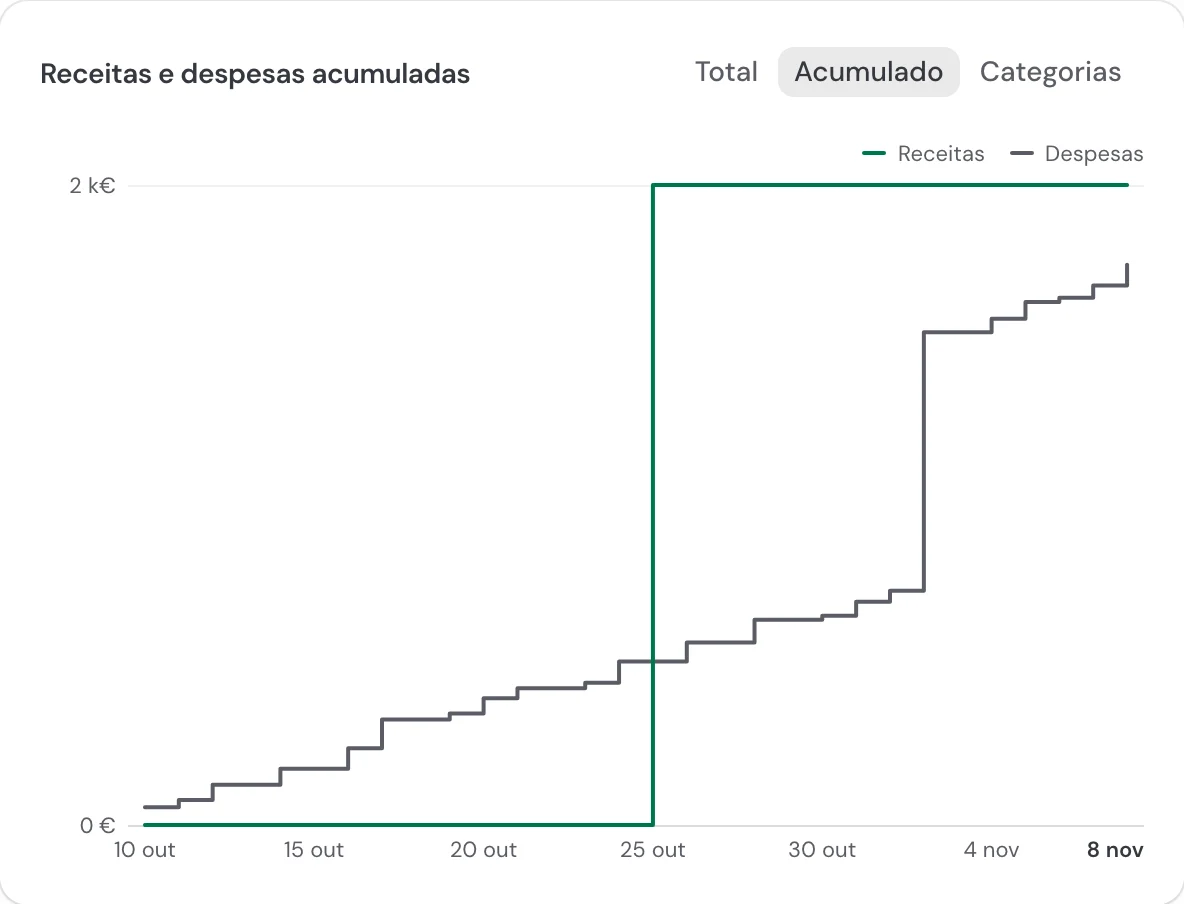
    The Running total view of the Cash flow chart adds up income and spending day by day across the period, and the gap between the two lines is what you had left by that day.

    Learn more
  2. New

    Track Portuguese property funds

    Property funds registered with the CMVM, Portugal’s market regulator, are now in the catalogue. Record your purchase and the holding’s value follows the unit price the fund publishes.

    Learn more
  3. New

    Count a refund against the expense it covers

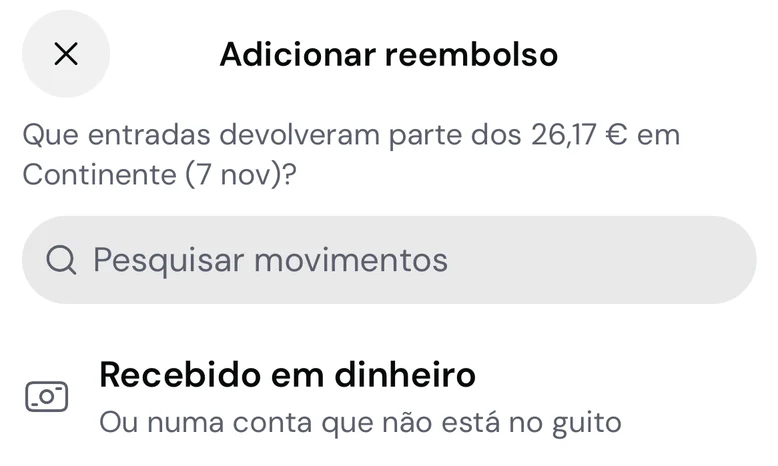
    Link money you got back, such as a friend’s share of a dinner, to the expense it belongs to. It then reduces that expense, in its own category and month, instead of counting as income. You can also record money someone paid you back in cash.

    Learn more
  4. Improvements

    19 to 25 October

    • Dividends and interest get their own categoryInvestment purchases and sales sit in a separate Investments group, and dividends and interest from connected brokers go straight to Dividends and interest.
  5. New

    See what your investments returned in each period

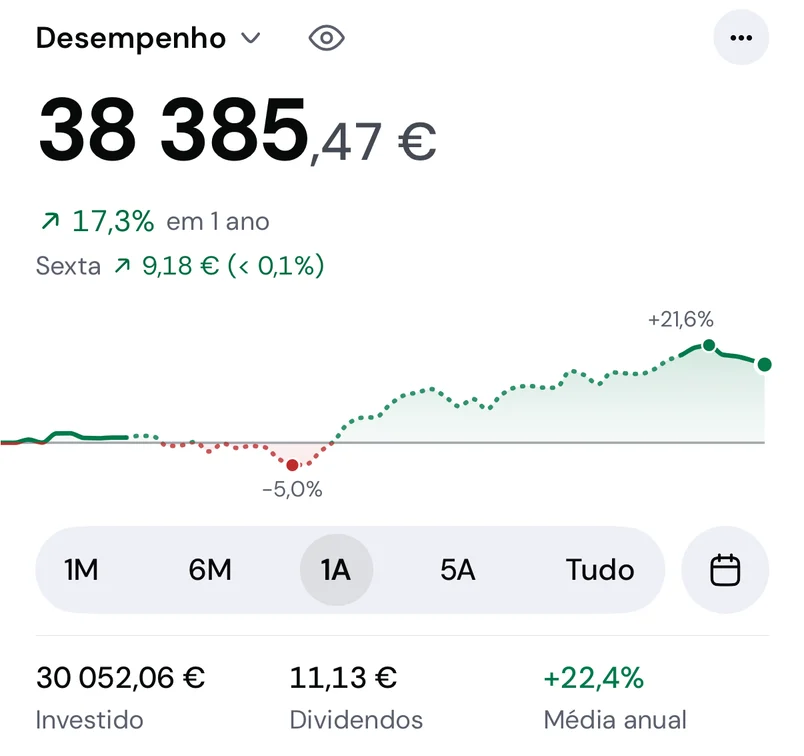
    The Performance view shows the period’s return as a percentage, dividends included, leaving out any money you put in or took out. With at least a year of history, each holding and the total also show the Annual return.

    Learn more
  6. Improvements

    12 to 18 October

    • US shares and crypto updated through the dayWhile the market is open, shares and ETFs on US exchanges and crypto update every 15 minutes, and today’s value follows the quote. There’s nothing you need to do.
  7. NewPlus plan

    Record trades by forwarding your broker’s emails

    For a broker that can’t be connected, forward the emails confirming each buy and sell to an address of your own, and the trades are recorded in your investments.

    Learn more
  8. Improvements

    5 to 11 October

    • Your Trading 212 holdings in about a minuteOnce the broker is connected, your holdings appear straight away, and gains show “Calculating” until every trade has come in.
    • Choose where each notification reaches youBy email or on your phone, topic by topic. Reminders to update balances and values move from email into the app.

September

  1. New

    Record delistings, takeovers and fund conversions

    When a company leaves the stock market, is bought out for cash, or a fund is converted into another, the holding shows a note on what happened and is valued at what the event gave you. You can record the outcome so your portfolio reflects it.

    Learn more
  2. New

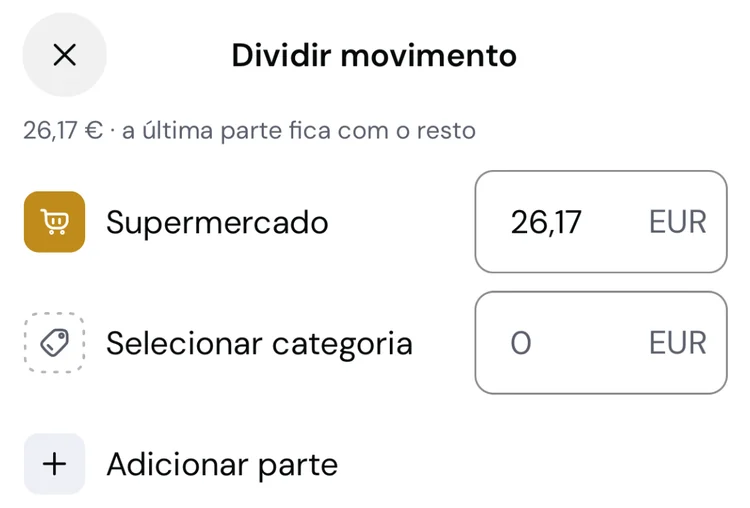
    Split a transaction across several categories

    Divide one transaction between several categories, each with its own amount. A supermarket run can be split between household and groceries, and each part counts towards its own category’s budget.

    Learn more